GitHub Actionsでアーティファクトのアップロードはactions/upload-artifact、ダウンロードはactions/download-artifactで行います。普段は同一ワークフローのジョブ間でアーティファクトを受け渡すのに使っていますが、他のワークフローやリポジトリのアーティファクトをダウンロードしたい場合もあります。
例えば、あるワークフローでネイティブビルドを行っていて10分かかります。そのビルド成果物を別のワークフローで使い回したいときに、改めてビルドすることなくダウンロードできます。ビルドで一番つらいのは時間がかかることなので、ビルド成果物を使い回せると助かりますよね。
今回は、actions/download-artifactでワークフローやリポジトリを跨いで、アーティファクトをダウンロードできるという話です。シラナカッタ。
何ができるのか
actions/download-artifact(v4以降/v3とv4の差分)を使って、他のワークフローやリポジトリのアーティファクトをダウンロードできます。例えば次のように書くと、run-idで指定した別ワークフローの実行履歴11100002222でアップロードされたすべてのアーティファクトを、今のワークフローにダウンロードします。
- uses: actions/download-artifact@37930b1c2abaa49bbe596cd826c3c89aef350131 # v7.0.0
  with:
    run-id: "11100002222"
    github-token: ${{ github.token }}
run-id: 対象ワークフローの履歴ページURLの末尾にある数字列。例えば、https://github.com/<ORG>/<REPO>/actions/runs/123456789なら123456789github-token: アクセス権限のあるGitHubトークン。同一リポジトリなら${{ github.token }}を指定すればOK。通常は無指定なので、指定必須name: 省略するとすべてのアーティファクトをダウンロード、特定の名前のアーティファクトだけ欲しい場合は指定
なお、ドキュメントにはactions: read権限をジョブにつけるように書かれていますが、同一リポジトリの場合は権限を指定しなくてもダウンロードできます。
使い方
私のリポジトリguitarrapc/githubactions-labを使って実際の挙動を見つつ使い方を確認しましょう。 今回は、同一リポジトリ内の他ワークフローからアーティファクトをダウンロードします。
アーティファクトをアップロードするワークフローを用意する
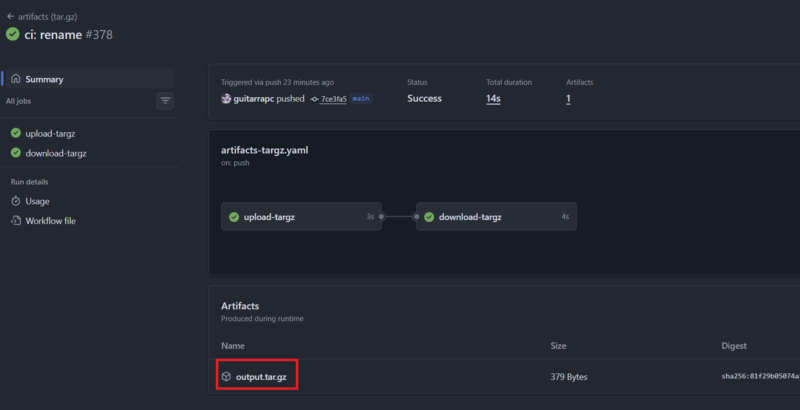
まずは、actions/upload-artifactでアップロードするワークフローartifacts-targz.yamlを用意して実行します。(artifacts (tar.gz) #378)
URLから、この時のrun-idは21203098493とわかります。
name: artifacts (tar.gz)
on:
  workflow_dispatch:
  pull_request:
    branches: [main]
  push:
    branches: [main]

jobs:
  # tar.gz
  upload-targz:
    permissions:
      contents: read
    runs-on: ubuntu-24.04
    timeout-minutes: 3
    steps:
      - name: output
        run: |
          mkdir -p ./output/bin
          echo "hoge" > ./output/hoge.txt
          echo "fuga" > ./output/fuga.txt
          echo "foo" > ./output/bin/foo.txt
          echo "bar" > ./output/bin/bar.txt
          tar -zcvf output.tar.gz ./output/
      - uses: actions/upload-artifact@b7c566a772e6b6bfb58ed0dc250532a479d7789f # v6.0.0
        with:
          name: output.tar.gz
          path: ./output.tar.gz
          retention-days: 1

  download-targz:
    needs: [upload-targz]
    # ... ただのアップロード確認なので省略
アップロードができたら、次に他のワークフローからダウンロードしてみましょう。
他のワークフローのアーティファクトをダウンロードする
次に、上記ワークフローでアップロードしたアーティファクトをダウンロードするワークフローartifacts-other-workflow.yamlを用意します。
run-idを指定した場合は「run-idの履歴」から、指定しなかった場合は「最新の成功ビルド履歴」からアーティファクトをダウンロードします。
name: artifacts (other workflow)
on:
  workflow_dispatch:
    inputs:
      workflow-name:
        description: "Workflow name to download artifacts from"
        required: true
        default: "artifacts-targz.yaml"
      run-id:
        description: "Run ID to download artifacts from (optional)"
        required: false
        default: ""

jobs:
  download-directory:
    permissions:
      contents: read
    runs-on: ubuntu-24.04
    timeout-minutes: 3
    steps:
      - name: List Run Ids of specified workflow
        run: gh run list -w ${{ inputs.workflow-name }} --status completed --limit 5
        env:
          GH_REPO: ${{ github.repository }}
          GH_TOKEN: ${{ github.token }}
      - name: Get latest Run Id of specified workflow
        if: ${{ inputs.run-id == '' }}
        id: get-run-id
        run: |
          run_id=$(gh run list -w ${{ inputs.workflow-name }} --status completed --limit 1 --json databaseId --jq ".[].databaseId")
          echo "run_id=$run_id" | tee -a "$GITHUB_OUTPUT"
        env:
          GH_REPO: ${{ github.repository }}
          GH_TOKEN: ${{ github.token }}
      - name: Get run details
        run: gh run view ${{ inputs.run-id || steps.get-run-id.outputs.run_id }}
        env:
          GH_REPO: ${{ github.repository }}
          GH_TOKEN: ${{ github.token }}
      - uses: actions/download-artifact@37930b1c2abaa49bbe596cd826c3c89aef350131 # v7.0.0
        with:
          run-id: ${{ inputs.run-id || steps.get-run-id.outputs.run_id }}
          github-token: ${{ github.token }}
      - name: ls
        run: ls -lR
実行してみましょう。run-idを指定してもいいですが、今回は空にして最新のビルドからダウンロードさせます。
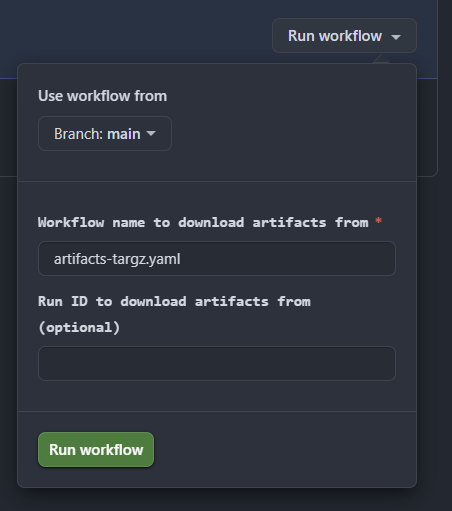
実行履歴をみると、指定したワークフローの最新成功ビルド履歴のrun-id21203098493からダウンロードできています。
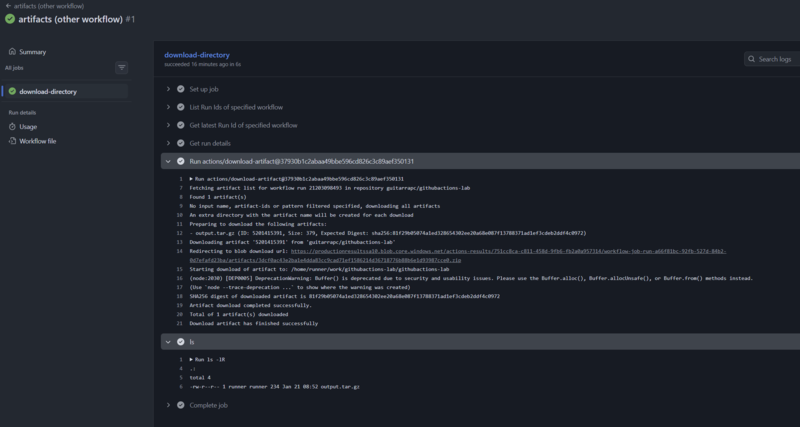
Run actions/download-artifact@37930b1c2abaa49bbe596cd826c3c89aef350131
  with:
    run-id: 21203098493
    github-token: ***
    merge-multiple: false
    repository: guitarrapc/githubactions-lab
Fetching artifact list for workflow run 21203098493 in repository guitarrapc/githubactions-lab
Found 1 artifact(s)
No input name, artifact-ids or pattern filtered specified, downloading all artifacts
An extra directory with the artifact name will be created for each download
Preparing to download the following artifacts:
- output.tar.gz (ID: 5201415391, Size: 379, Expected Digest: sha256:81f29b05074a1ed328654302ee20a68e087f13788371ad1ef3cdeb2ddf4c0972)
Downloading artifact '5201415391' from 'guitarrapc/githubactions-lab'
Redirecting to blob download url: https://productionresultssa10.blob.core.windows.net/actions-results/751cc8ca-c811-458d-9fb6-fb2a0a957314/workflow-job-run-a66f81bc-92fb-527d-84b2-0d7efafd23ba/artifacts/3dcf0ac43e2ba1e4dda83cc9cad71ef1586214d36718776b88b6e1d93987cce0.zip
Starting download of artifact to: /home/runner/work/githubactions-lab/githubactions-lab
(node:2030) [DEP0005] DeprecationWarning: Buffer() is deprecated due to security and usability issues. Please use the Buffer.alloc(), Buffer.allocUnsafe(), or Buffer.from() methods instead.
(Use `node --trace-deprecation ...` to show where the warning was created)
SHA256 digest of downloaded artifact is 81f29b05074a1ed328654302ee20a68e087f13788371ad1ef3cdeb2ddf4c0972
Artifact download completed successfully.
Total of 1 artifact(s) downloaded
Download artifact has finished successfully
ワークフローを跨いでアーティファクトをダウンロードできるんですねー!
トラブルシュート
いくつか遭遇したトラブルとその対処法を紹介します。
run-idを指定したのにアーティファクトが見つからない
デフォルトのactions/download-artifactは、github-tokenが空のためrun-idだけ指定してもアーティファクトが見つからないと出ます。
例えば、次の設定だとgithub-tokenが無指定なのでアーティファクトが見つかりません。エラーログからはトークンがないことためと分からないのでハマりやすいです。ハマった。
# ❌
- uses: actions/download-artifact@37930b1c2abaa49bbe596cd826c3c89aef350131 # v7.0.0
  with:
    run-id: 1234
Found 0 artifact(s)
No input name, artifact-ids or pattern filtered specified, downloading all artifacts
An extra directory with the artifact name will be created for each download
Total of 0 artifact(s) downloaded
Download artifact has finished successfully
この場合、github-tokenに${{ github.token }}やPATを指定しましょう。
# OK
- uses: actions/download-artifact@37930b1c2abaa49bbe596cd826c3c89aef350131 # v7.0.0
  with:
    run-id: 1234
    github-token: ${{ github.token }}
github-tokenとrun-idを指定したのにアーティファクトが見つからない
別のリポジトリの場合、ワークフローで自動発行されるトークン${{ github.token }}ではアクセスできません。
# ❌
- uses: actions/download-artifact@37930b1c2abaa49bbe596cd826c3c89aef350131 # v7.0.0
  with:
    run-id: 9876
    repository: some/other-repo
    github-token: ${{ github.token }}
この場合、PATかGitHub Appのインストールアクセストークンを使う必要があります。
# OK
- uses: actions/download-artifact@37930b1c2abaa49bbe596cd826c3c89aef350131 # v7.0.0
  with:
    run-id: 9876
    repository: some/other-repo
    github-token: ${{ secrets.YOUR_PAT }}
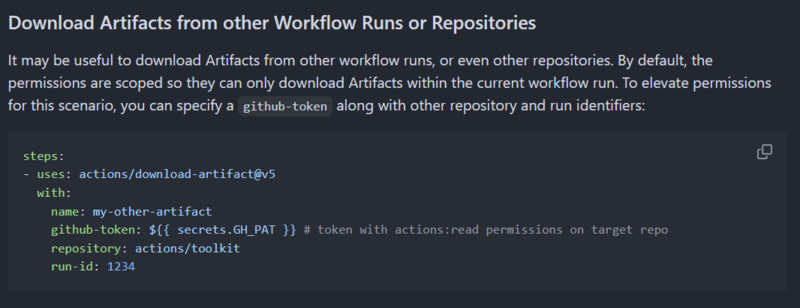
また、PATにはactions: read権限が必要です。
To elevate permissions for this scenario, you can specify a github-token along with other repository and run identifiers:
権限に問題がないがアーティファクトが見つからない
actions/upload-artifactでアーティファクトをアップロードしたアーティファクトは、一定の期間だけ保持されます。デフォルトで特に指定なければ90日間ですが、ワークフローでretention-daysを指定している場合はその日数になります。
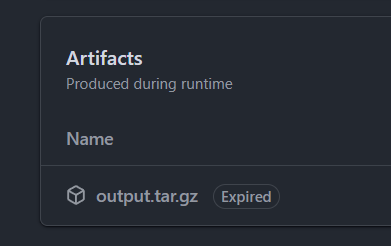
私はよくretention-days: 1にしているため、翌日にはアーティファクトが消えていて見つからなくなります。アーティファクトが見つからない場合は、対象のrun-idのアーティファクトがまだ存在しているか確認してください。
期限が切れている場合、次のようにExpiredと表示されます。
まとめ
actions/download-artifact@v3までは同一ワークフローからしか取得できなかったので、てっきり今もかと考えていましたが、v4(2023年12月15日リリース)以降は他のワークフローやリポジトリのアーティファクトもダウンロードできます。
中にはGitHub APIを駆使して取得する例もありますが、アーティファクトをAPIで触るのは割と面倒です。actions/download-artifactを使えるシーンでは積極的に使っていきましょう。
