パッケージの利用、ローカルテスト、ビルド、Visual Studioからのデプロイまで来たのでローカル開発は問題なくできそうですね。ただCIがないままではチーム開発がしにくいです。
http://tech.guitarrapc.com/entry/2016/12/05/055458
今回は、.NET Core on LambdaをCIで回す方法についてみていきます。
先人の知恵
先人の知恵があります。Circle CIでの例ですが、今回のベースになっています。
今回は、Circle CIとVisual Studio Team Service (VSTS) を試してみましょう。
デプロイ方法
Cloud FormationやTerraformはちょっと重厚すぎる、Serverless Frameworkほどではない。ぐらいの温度感で行きたいので、dotnet lambdaを用いましょう。
dotnet lambdaに関しては、コードをみるのもいいでしょう。
default-settings.json について
dotnet lambbdaコマンドで渡す内容をdefault-settings.jsonへ定義しておけばずいぶんとシンプルになります。
https://aws.amazon.com/jp/blogs/developer/using-the-aws-lambda-project-in-visual-studio/
https://aws.amazon.com/jp/blogs/developer/aws-serverless-applications-in-visual-studio/
今回はデフォルトのものにfunction-nameとfunction-nameの2パラメータを追加しています。この2つを足すことで、function名、roleが指定可能になりCIが捗ります。*1
  "function-name": "GithubWebhook",
  "function-role": "arn:aws:iam::ACCOUNTID:role/service-role/lambda_exec_role"
https://gist.github.com/guitarrapc/f81681e4a9571570056d64cb7c50eca7
.Net Core 1.0 の構築
CircleCIはUbuntu環境です。.NET Coreは入っていないので入れましょう。
| CI環境 | .NET Core有無 (インストールが必要) |
|---|---|
| CircleCI | なし (Ubuntu12 or 14) |
| VSTS Hosted Windows | あり |
| VSTS Hosted Linux | あり |
| VSTS Agent | なし (環境に依存します) |
Ubuntuそれぞれの環境構築コマンドは以下にまとまっています。
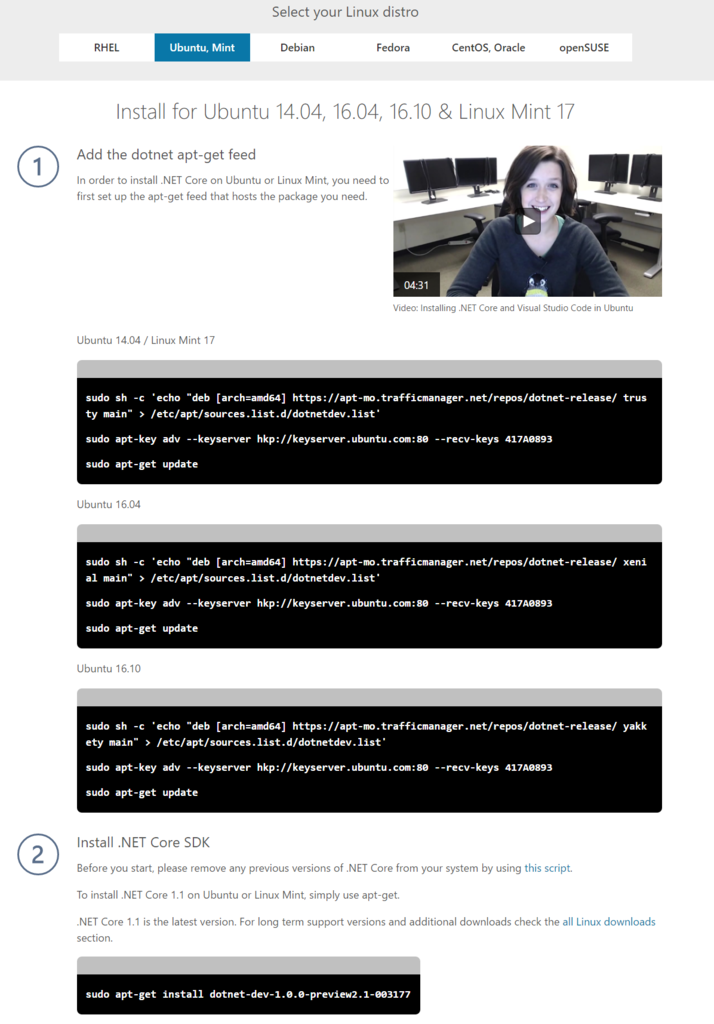
ただし、ここのバージョンは .NET Core 1.1です。現状のAWS Lambdaが .NET Core 1.0なので、対象パッケージを変えます。ちなみにこのままやると以下のようなエラーに会います。
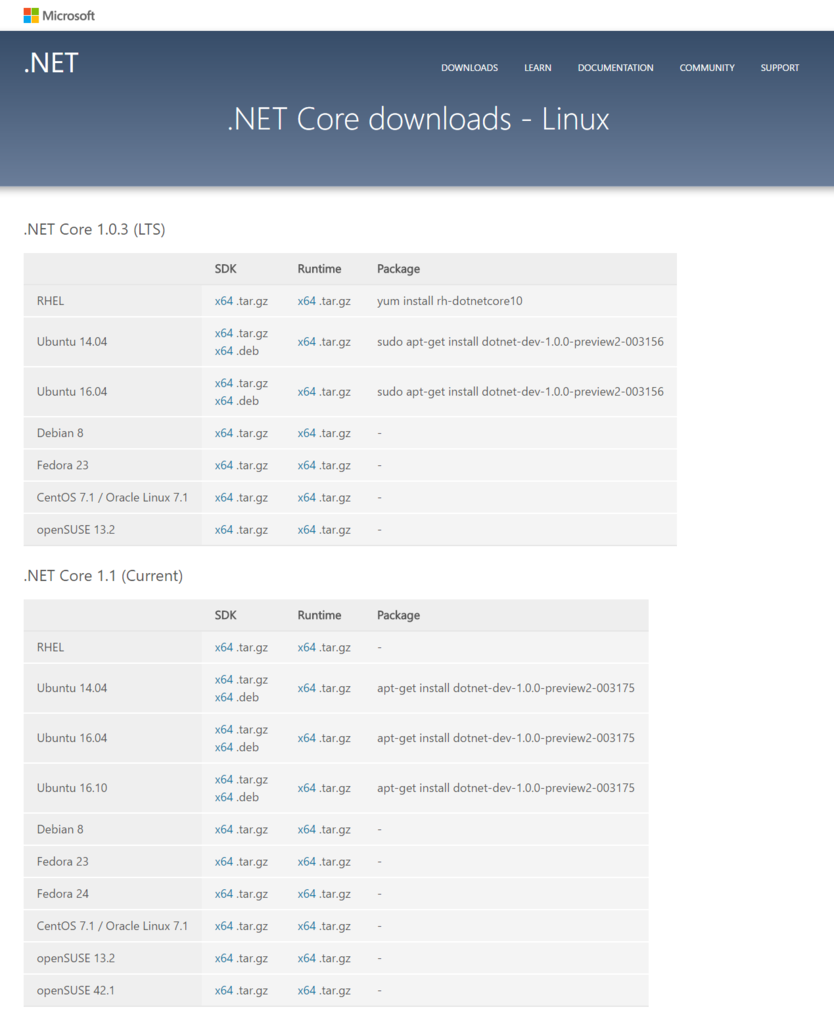
.NET Core 1.0の最新パッケージバージョンは以下のURLで確認できます。
Circle CI
Circle CIのアカウントを持っていない場合は作ってしまいます。リポジトリ側とCircle CIでそれぞれ設定しておくことがあるので見てみましょう。
(リポジトリ側作業) circle.yml の作成
CircleCIのビルドタスクは、circle.ymlで記述できます。これをリポジトリの直下においておけば、CircleCIでビルドが走った時に自動的に利用されてるので記述しましょう。
今回は、circle.ymlに以下のタスクを記述します。
.net core 1.0環境の構築dotnet restoreのビルド前実行dotnet buildによるコンパイルテストdotnet testによる実行テストdotnet lambda deploy-functionによるAWS Lambdaへのデプロイ
ざくっと書きました。
https://gist.github.com/guitarrapc/28b6cce83d940f569cfb9e7c48e0b536
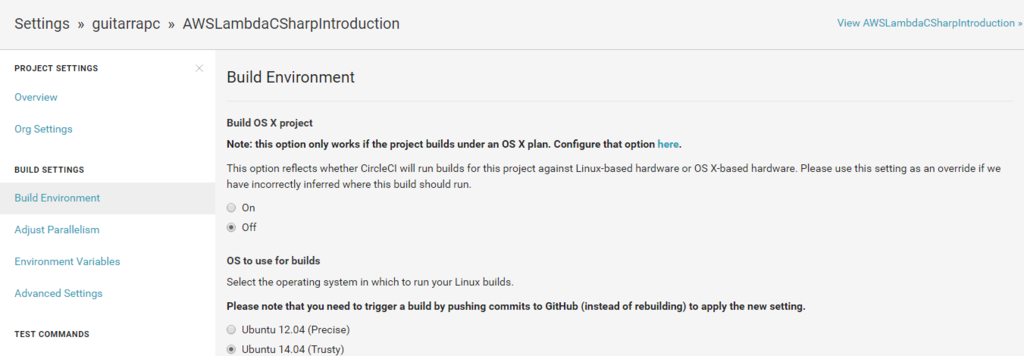
CircleCIは、Ubuntu 14で行きます。
(CircleCI作業) 環境変数
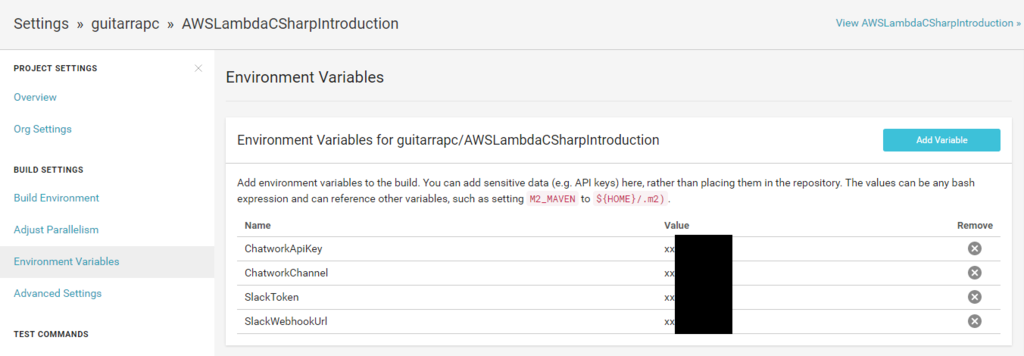
AWS Lambdaで、環境変数にリポジトリへ入れたくない情報を入れました。CircleCIでテストするにあたり、同様にこれらの情報を環境変数に入れます。
(CircleCI作業) AWS Lambda への デプロイIAM User Access/Secret
AWSに、dotnet lambda deploy-functionでデプロイするにあたり、Circle CIには、IAM UserのAccess Key/Secret Keyを取得、設定します。ACCOUNT_IDにはご自分のIDをどうぞ。
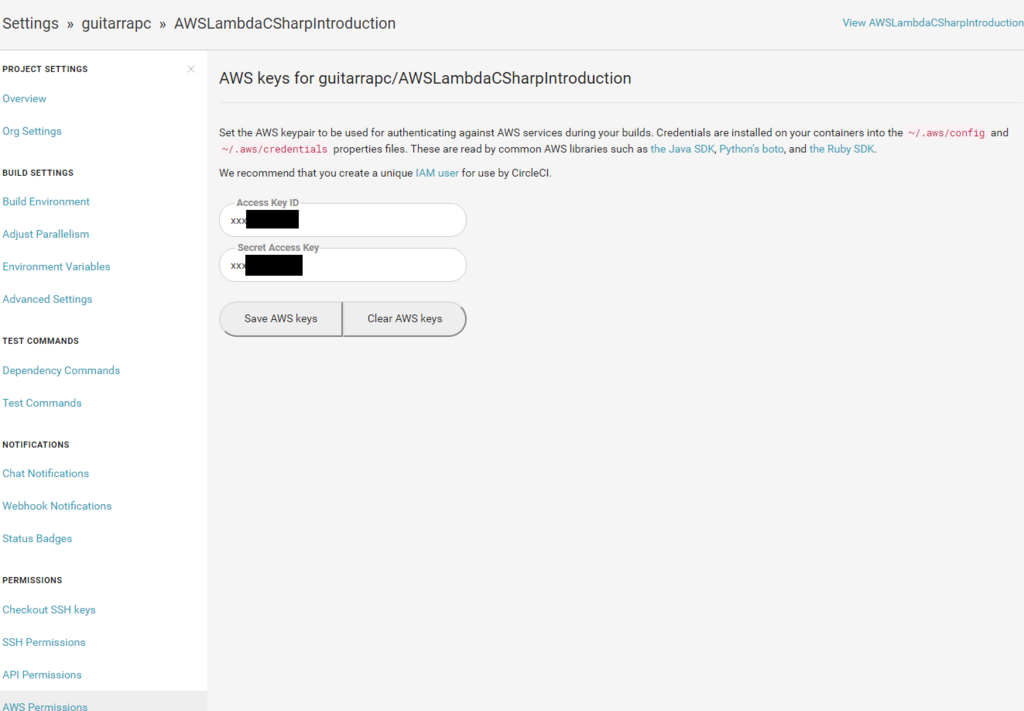
今回は、Lambda Functionの新規作成、更新を踏まえて以下のPermissionにしました。
https://gist.github.com/guitarrapc/85b94f4fbbb322ea03027ffd3c0925c5
ビルド実行
あとは、git pushでトリガーされます。

dotnet lambda deploy-functionをみてもいい感じですね。
Executing publish command
... invoking 'dotnet publish', working folder '/home/ubuntu/AWSLambdaCSharpIntroduction/AWSLambdaCSharpIntroduction/SlackSlashCommandWebhook/SlackSlashCommandWebhook/bin/Release/netcoreapp1.0/publish'
... publish: Publishing SlackSlashCommandWebhook for .NETCoreApp,Version=v1.0
... publish: Project LambdaShared (.NETStandard,Version=v1.6) was previously compiled. Skipping compilation.
... publish: Project SlackSlashCommandWebhook (.NETCoreApp,Version=v1.0) will be compiled because expected outputs are missing
... publish: Compiling SlackSlashCommandWebhook for .NETCoreApp,Version=v1.0
... publish: /home/ubuntu/AWSLambdaCSharpIntroduction/AWSLambdaCSharpIntroduction/SlackSlashCommandWebhook/SlackSlashCommandWebhook/Function.cs(25,35): warning CS1998: This async method lacks 'await' operators and will run synchronously. Consider using the 'await' operator to await non-blocking API calls, or 'await Task.Run(...)' to do CPU-bound work on a background thread.
... publish: Compilation succeeded.
... publish:     1 Warning(s)
... publish:     0 Error(s)
... publish: Time elapsed 00:00:01.6428709
... publish:
... publish: publish: Published to /home/ubuntu/AWSLambdaCSharpIntroduction/AWSLambdaCSharpIntroduction/SlackSlashCommandWebhook/SlackSlashCommandWebhook/bin/Release/netcoreapp1.0/publish
... publish: Published 1/1 projects successfully
Changed permissions on published dll (chmod +r SlackSlashCommandWebhook.dll).
Changed permissions on published dll (chmod +r Amazon.Lambda.Core.dll).
Changed permissions on published dll (chmod +r Amazon.Lambda.Serialization.Json.dll).
Changed permissions on published dll (chmod +r Amazon.Lambda.TestUtilities.dll).
Changed permissions on published dll (chmod +r Newtonsoft.Json.dll).
Changed permissions on published dll (chmod +r System.Runtime.Serialization.Primitives.dll).
Changed permissions on published dll (chmod +r LambdaShared.dll).
Zipping publish folder /home/ubuntu/AWSLambdaCSharpIntroduction/AWSLambdaCSharpIntroduction/SlackSlashCommandWebhook/SlackSlashCommandWebhook/bin/Release/netcoreapp1.0/publish to /home/ubuntu/AWSLambdaCSharpIntroduction/AWSLambdaCSharpIntroduction/SlackSlashCommandWebhook/SlackSlashCommandWebhook/bin/Release/netcoreapp1.0/SlackSlashCommandWebhook.zip
... publish:   adding: SlackSlashCommandWebhook.dll (deflated 59%)
... publish:   adding: SlackSlashCommandWebhook.pdb (deflated 46%)
... publish:   adding: Amazon.Lambda.Core.dll (deflated 57%)
... publish:   adding: Amazon.Lambda.Serialization.Json.dll (deflated 56%)
... publish:   adding: Amazon.Lambda.TestUtilities.dll (deflated 61%)
... publish:   adding: Newtonsoft.Json.dll (deflated 60%)
... publish:   adding: System.Runtime.Serialization.Primitives.dll (deflated 48%)
... publish:   adding: LambdaShared.dll (deflated 60%)
... publish:   adding: LambdaShared.pdb (deflated 43%)
... publish:   adding: SlackSlashCommandWebhook.deps.json (deflated 72%)
... publish:   adding: SlackSlashCommandWebhook.runtimeconfig.json (deflated 22%)
Created publish archive (/home/ubuntu/AWSLambdaCSharpIntroduction/AWSLambdaCSharpIntroduction/SlackSlashCommandWebhook/SlackSlashCommandWebhook/bin/Release/netcoreapp1.0/SlackSlashCommandWebhook.zip).
Updating code for existing function
VSTS
Windows / Linuxともに、Hosted Agentでは2つが障壁となってデプロイできません。これらは自前環境にAgentを入れることで回避ができます。
| 問題 | Agent の場合の解決方法 |
|---|---|
| ~/.aws/config が作成できない | 作成してください。こんなことができないようになっているのは仕方ないとはいえ、見るところ間違えてますかねぇ。 |
| VSTS UI 上の Environment Variables がコードに渡らない | OS の環境変数に入れてください。こんなことができな(略 |
ということで、VSTSでAWS LambdaをCIする場合は、hosted agentではなく、自前エージェントでどうぞ。
~/.aws/config が作成できない
単純にこれをやるだけなんですが、厳しい...です。
http://docs.aws.amazon.com/cli/latest/userguide/cli-chap-getting-started.html
結果、default profileが見つからずdefaultは実行できない、と。
******************************************************************************
Starting: Run echo
******************************************************************************
==============================================================================
Task         : Command Line
Description  : Run a command line with arguments
Version      : 1.1.1
Author       : Microsoft Corporation
Help         : [More Information](https://go.microsoft.com/fwlink/?LinkID=613735)
==============================================================================
/bin/echo '[default]' > ~/.aws/config
'[default]' > ~/.aws/config
******************************************************************************
Finishing: Run echo
******************************************************************************
******************************************************************************
Starting: Run ls
******************************************************************************
==============================================================================
Task         : Command Line
Description  : Run a command line with arguments
Version      : 1.1.1
Author       : Microsoft Corporation
Help         : [More Information](https://go.microsoft.com/fwlink/?LinkID=613735)
==============================================================================
/bin/ls ~/.aws/config
/bin/ls: cannot access '~/.aws/config': No such file or directory
/bin/ls failed with return code: 2
/bin/ls failed with error: /bin/ls failed with return code: 2
******************************************************************************
Finishing: Run ls
******************************************************************************```
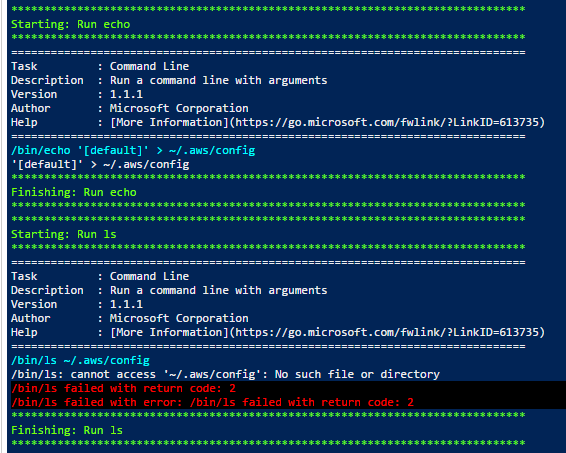
Error retrieving configuration for function GitHubWebhook: Profile default cannot be found
/usr/bin/dotnet failed with return code: 255
/usr/bin/dotnet failed with error: /usr/bin/dotnet failed with return code: 255
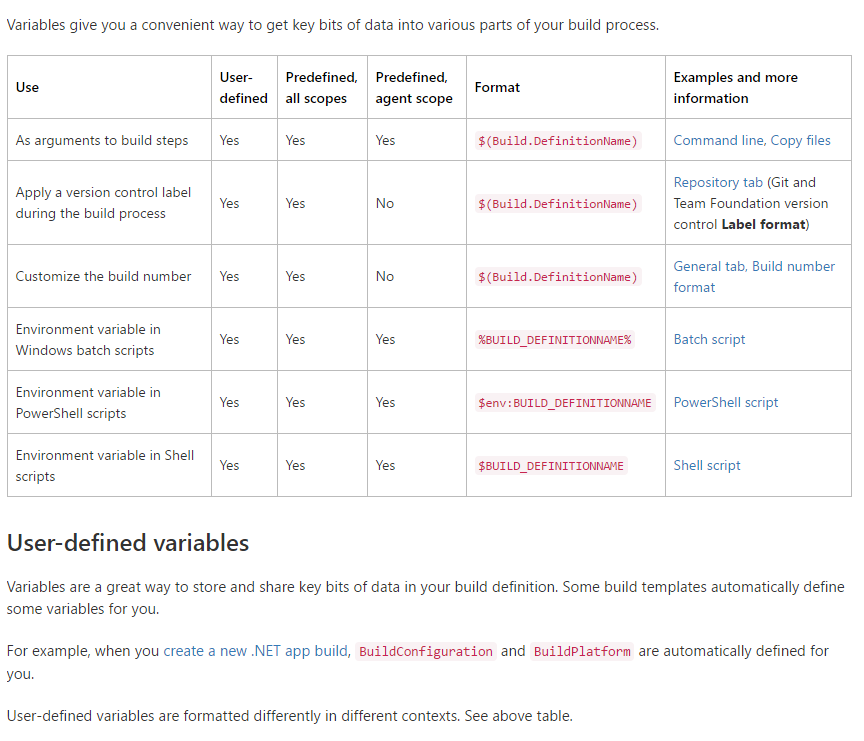
VSTS UI 上の Environment Variables がコードに渡らない
単純にC#コードから、Environemnt.GetVariable()で取得できると思ったんですが... CircleCIでできてVSTS Hosted Agentでできないのは何かやり方おかしいんですかねぇ。
https://www.visualstudio.com/ja-jp/docs/build/define/variables
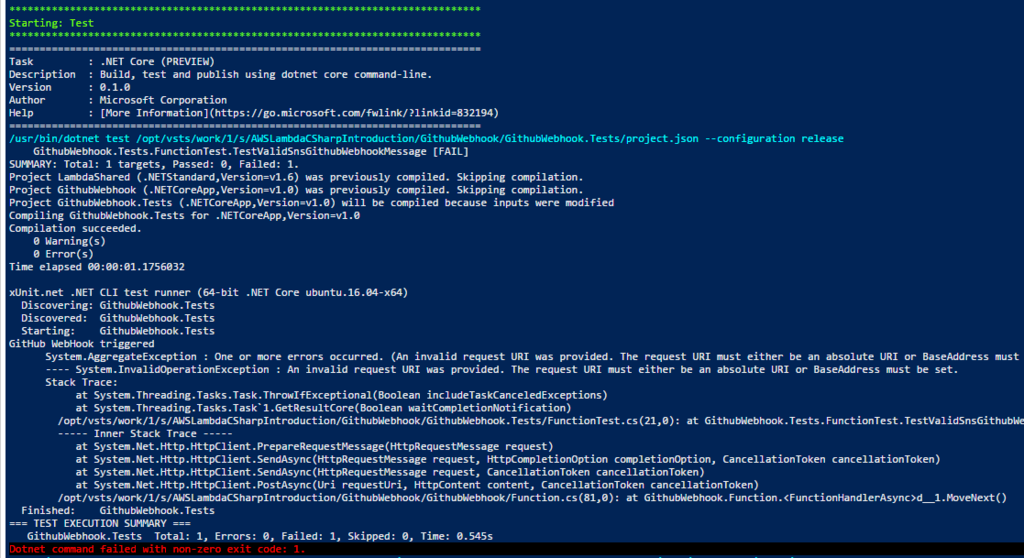
Hosted agentでは、環境依存を環境変数に逃がしている場合に、.Testsでコードを通せなくなっています。
==============================================================================
Task         : .NET Core (PREVIEW)
Description  : Build, test and publish using dotnet core command-line.
Version      : 0.1.0
Author       : Microsoft Corporation
Help         : [More Information](https://go.microsoft.com/fwlink/?linkid=832194)
==============================================================================
/usr/bin/dotnet test /opt/vsts/work/1/s/AWSLambdaCSharpIntroduction/GitHubWebhook/GitHubWebhook.Tests/project.json --configuration release
    GitHubWebhook.Tests.FunctionTest.TestValidSnsGitHubWebhookMessage [FAIL]
SUMMARY: Total: 1 targets, Passed: 0, Failed: 1.
Project LambdaShared (.NETStandard,Version=v1.6) was previously compiled. Skipping compilation.
Project GitHubWebhook (.NETCoreApp,Version=v1.0) was previously compiled. Skipping compilation.
Project GitHubWebhook.Tests (.NETCoreApp,Version=v1.0) will be compiled because inputs were modified
Compiling GitHubWebhook.Tests for .NETCoreApp,Version=v1.0
Compilation succeeded.
    0 Warning(s)
    0 Error(s)
Time elapsed 00:00:01.1756032

xUnit.net .NET CLI test runner (64-bit .NET Core ubuntu.16.04-x64)
  Discovering: GitHubWebhook.Tests
  Discovered:  GitHubWebhook.Tests
  Starting:    GitHubWebhook.Tests
GitHub WebHook triggered
      System.AggregateException : One or more errors occurred. (An invalid request URI was provided. The request URI must either be an absolute URI or BaseAddress must be set.)
      ---- System.InvalidOperationException : An invalid request URI was provided. The request URI must either be an absolute URI or BaseAddress must be set.
      Stack Trace:
           at System.Threading.Tasks.Task.ThrowIfExceptional(Boolean includeTaskCanceledExceptions)
           at System.Threading.Tasks.Task`1.GetResultCore(Boolean waitCompletionNotification)
        /opt/vsts/work/1/s/AWSLambdaCSharpIntroduction/GitHubWebhook/GitHubWebhook.Tests/FunctionTest.cs(21,0): at GitHubWebhook.Tests.FunctionTest.TestValidSnsGitHubWebhookMessage()
        ----- Inner Stack Trace -----
           at System.Net.Http.HttpClient.PrepareRequestMessage(HttpRequestMessage request)
           at System.Net.Http.HttpClient.SendAsync(HttpRequestMessage request, HttpCompletionOption completionOption, CancellationToken cancellationToken)
           at System.Net.Http.HttpClient.SendAsync(HttpRequestMessage request, CancellationToken cancellationToken)
           at System.Net.Http.HttpClient.PostAsync(Uri requestUri, HttpContent content, CancellationToken cancellationToken)
        /opt/vsts/work/1/s/AWSLambdaCSharpIntroduction/GitHubWebhook/GitHubWebhook/Function.cs(81,0): at GitHubWebhook.Function.<FunctionHandlerAsync>d__1.MoveNext()
  Finished:    GitHubWebhook.Tests
=== TEST EXECUTION SUMMARY ===
   GitHubWebhook.Tests  Total: 1, Errors: 0, Failed: 1, Skipped: 0, Time: 0.545s
Dotnet command failed with non-zero exit code: 1.
まとめ
CircleCIは流石、圧倒的な構築の容易さがあります。VSTSは、まぁシカタナイ。見るところがおかしいような気もします。
.NET Core on AWS Lambdaは、.NET Coreなだけあっていい感じにLinux上でビルドできるので、CircleCI便利です。オススメ。
今回の内容もリポジトリに置いておきます 。
*1:省くと初めて作成するときに対話プロンプトで聞かれて困ったります
